Stable CAN Channel Naming
Channel binding gives Linux CAN interfaces stable and predictable names after rebooting or reconnecting devices. The SDK supports driver-based naming, physical USB-port binding and device-ID binding.
Driver-Based Naming
Run:
sudo ./build.sh -rulesThe script creates /etc/udev/rules.d/99-kcan-driver.rules, matches DRIVERS=="kcan" and assigns names such as kcan0, kcan1 and so on. Reconnect the USB device after applying the rule.
ip link show | grep kcan
Advantages: simple setup.
Best for: small installations without a fixed channel-to-device mapping.
Limitation: numbering can change with enumeration order.
Physical USB-Port Binding
This method uses the USB topology path to bind one physical port to a fixed interface name.
1. Find the Topology Path
udevadm info -a -p /sys/class/net/can0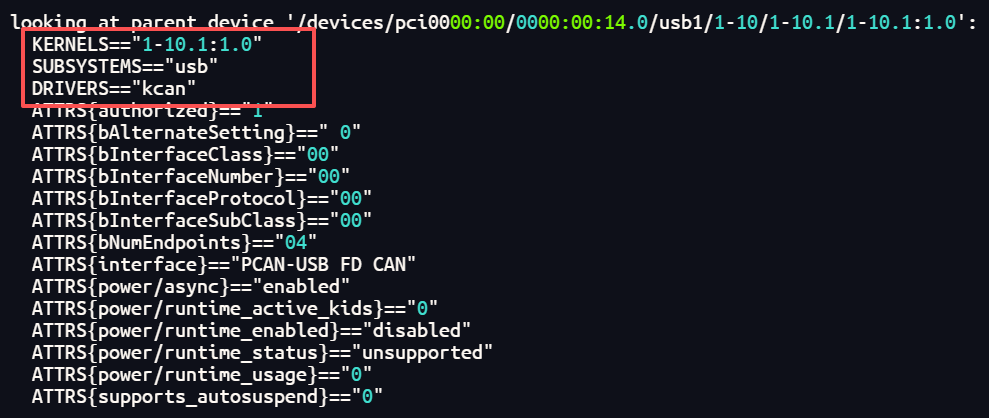
2. Create a udev Rule
sudo vi /etc/udev/rules.d/99-kcan-usb.rulesExample:
SUBSYSTEM=="net", ACTION=="add", DRIVERS=="kcan", \
    KERNELS=="5-1.3:1.0", \
    ATTR{dev_id}=="0x0", \
    NAME="kcan0"

SUBSYSTEM=="net", ACTION=="add", DRIVERS=="kcan", \
    KERNELS=="5-1.4:1.0", \
    ATTR{dev_id}=="0x0", \
NAME="kcan1"KERNELSis the physical USB path.DRIVERS=="kcan"limits the rule to the KCAN driver.NAMEis the target network-interface name.
3. Reload and Verify
sudo udevadm control --reload-rules
sudo udevadm trigger --subsystem-match=net --action=add
ip link show kcan0 kcan1
This is reliable for fixed installations, but moving a device to another physical USB port requires a rule update.
Device-ID Binding
Device-ID binding stores a unique numeric ID in the hardware and lets the driver assign names from that ID. It is independent of USB position and enumeration order.
1. Assign IDs
# First device
kcan-settings -f=/dev/kcanusbfd32 -d 66

# Second device
kcan-settings -f=/dev/kcanusbfd33 -d 67
Use IDs from 1 to 255, keep them unique within one system, and document the assignment.
2. Verify an ID
kcan-settings -f=/dev/kcanusbfd32 -d3. Enable ID-Based Assignment
Edit /etc/modprobe.d/kcan.conf:
options kcan assign=devidReload the module:
sudo rmmod kcan
sudo modprobe kcan
Reconnect the devices and verify the resulting interfaces.
