kcanfd_test — Stress Test Tool
Purpose
kcanfd_test verifies transmit / receive integrity and stability under high CAN or CAN FD load.
The tool:
- Automatically pairs an even number of channels or accepts manually selected pairs
- Supports Classical CAN and CAN FD
- Configures arbitration rate, data rate, frame count and payload length
- Produces detailed test logs
Wiring
Connect CAN channels in pairs before testing. Default automatic pairs are:
can0 ↔ can1can2 ↔ can3can4 ↔ can5
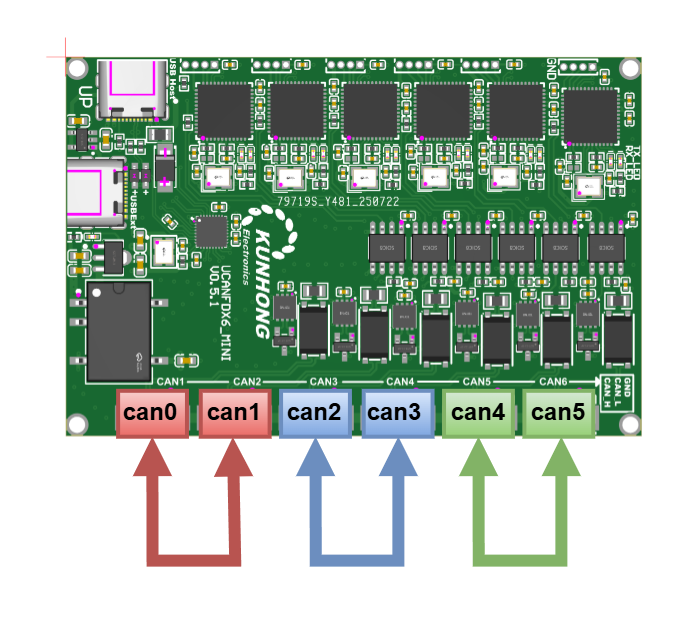
Use correct CAN_H, CAN_L and ground connections, and install 120 Ω termination at both physical ends of each test bus.
Quick Start
Default settings:
- Mode:
fd - Channels:
2 - Arbitration rate:
1000000 - Data rate:
5000000 - Frames per port:
1000000 - Payload:
8bytes
bash
sudo kcanfd_testTest four automatically paired channels:
bash
sudo kcanfd_test -c 4Select one or more non-sequential pairs:
bash
sudo kcanfd_test -p can0:can2
sudo kcanfd_test -p can0:can2 -p can1:can3
Run kcan_monitor in another terminal to observe state and counters during the test.
Parameters
| Parameter | Description | Default | Example |
|---|---|---|---|
-c NUM | Number of ports used for automatic pairing | 2 | -c 4 |
-p receiver:sender | Manual pair; repeatable and overrides -c | None | -p can0:can2 |
-m MODE | can for Classical CAN or fd for CAN FD | fd | -m can |
-b BITRATE | Arbitration bit rate in bit/s | 1000000 | -b 500000 |
-d DBITRATE | CAN FD data bit rate in bit/s | 5000000 | -d 2000000 |
-t COUNT | Frames per port | 1000000 | -t 500000 |
-s SIZE | Payload length in bytes | 8 | -s 64 |
-h | Display help | — | -h |
Valid payload lengths:
- Classical CAN:
0–8 - CAN FD:
0–8,12,16,20,24,32,48,64
Examples
bash
# Default CAN FD test with two ports
sudo kcanfd_test

# Classical CAN with four automatically paired ports
sudo kcanfd_test -m can -c 4

# CAN FD with four automatically paired ports
sudo kcanfd_test -c 4

# Classical CAN on a selected pair at 500 kbit/s
sudo kcanfd_test -m can -p can0:can2 -b 500000

# CAN FD on a selected pair at 500 kbit/s / 2 Mbit/s
sudo kcanfd_test -p can0:can2 -b 500000 -d 2000000

# 500,000 frames per port
sudo kcanfd_test -m can -p can0:can2 -t 500000

# 64-byte CAN FD payload
sudo kcanfd_test -p can0:can2 -s 64
Logs
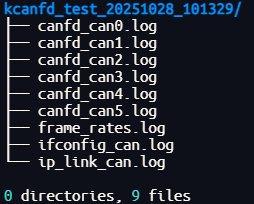
The generated log contains channel pairs, frame statistics, frame rate, error counters and pass / fail results.

Notes
- Verify the physical channel pairs before starting.
- With automatic pairing,
-cmust equal the number of participating ports. - If the test fails, inspect wiring, termination, bit timing and the generated logs.